
Car Photography in Bad Weather: Winter, Rain and Crowded Lots
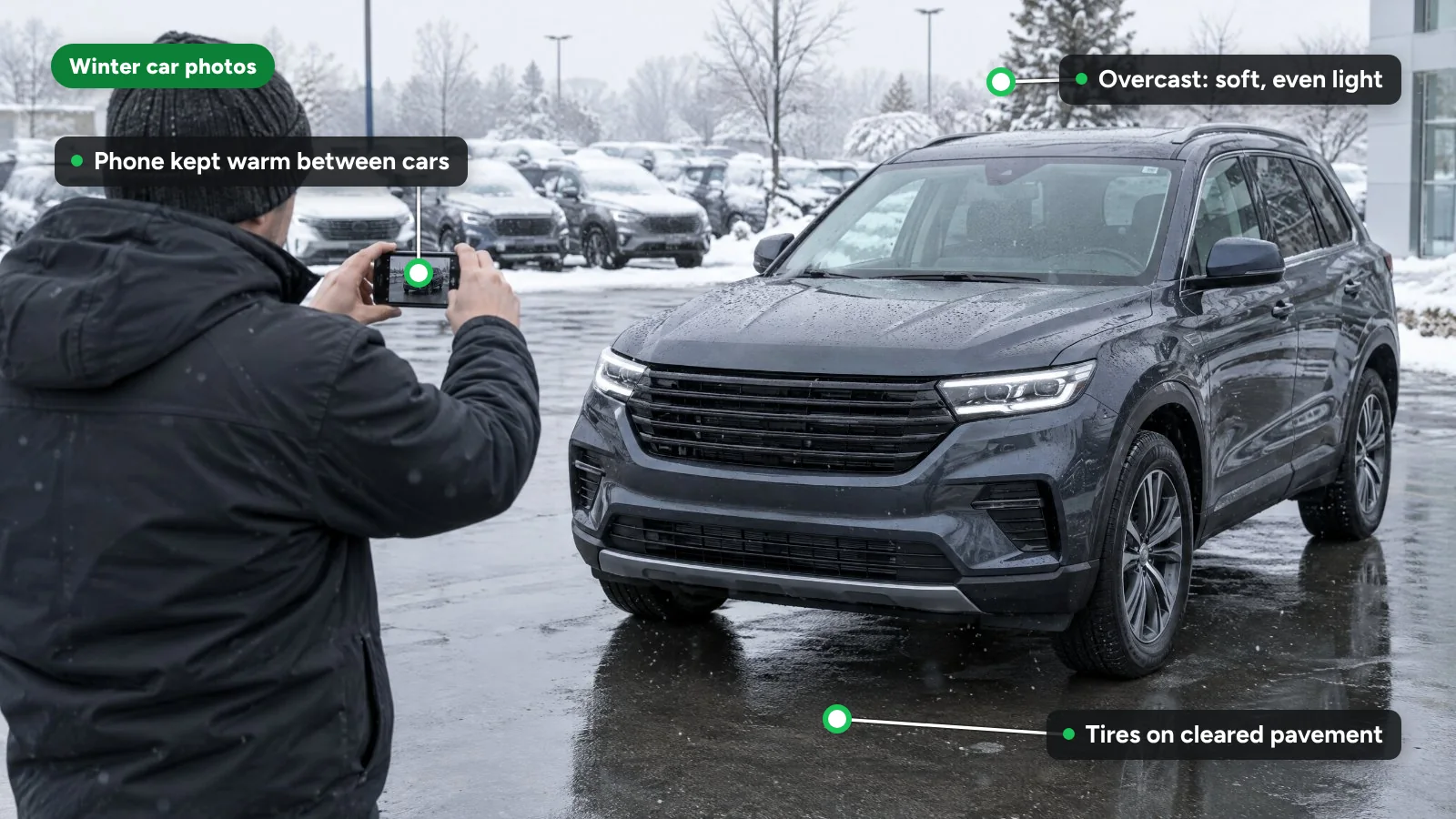
To photograph cars in bad weather, wash and dry the car, clear snow from it and the ground, shoot under overcast light, keep the phone warm between cars, and move each car to one clear photo spot. When rain, snow, darkness or a full lot make that impossible, switch to an indoor bay or a background replacement.
This guide covers weather and lot conditions only. For angles, camera height and shot lists, see our dealership photography tips.
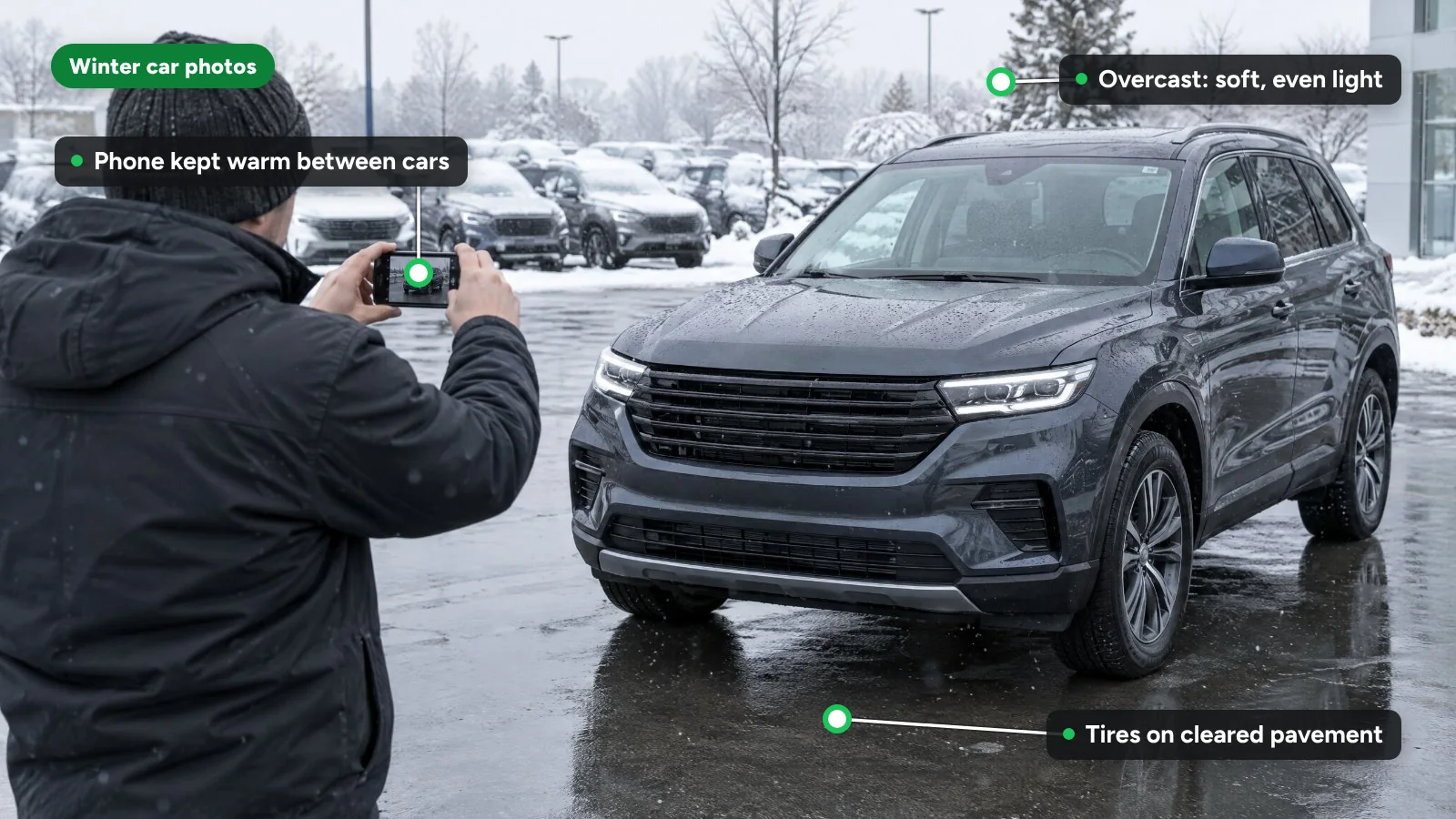
How do you prepare a car for photos in snow, slush and salt?
- Wash the lower half and the wheels. Road salt dries to a white film that shows on dark paint and makes wheels look neglected in close-ups.
- Dry the paint. Water spots and drips show in every reflection. Use clean microfiber towels and dry the glass last.
- Clear all the snow. Roof, hood, trunk lid, glass, mirrors, wheels and the plate area. Snow hides panels the buyer needs to see.
- Clear the ground. Shovel or blow a patch around the car so the tires sit on pavement, not in a drift, and keep plowed piles out of the background.
- Defrost the glass. Run the heater and defroster for a few minutes so interior shots are not hazy, then wipe the inside of the glass.
- Swap the floor mats. Wet, salt-stained mats make a clean interior look worn. Keep a clean set for photos.
How do you photograph cars in the rain?
Light rain is workable. Heavy rain is not.
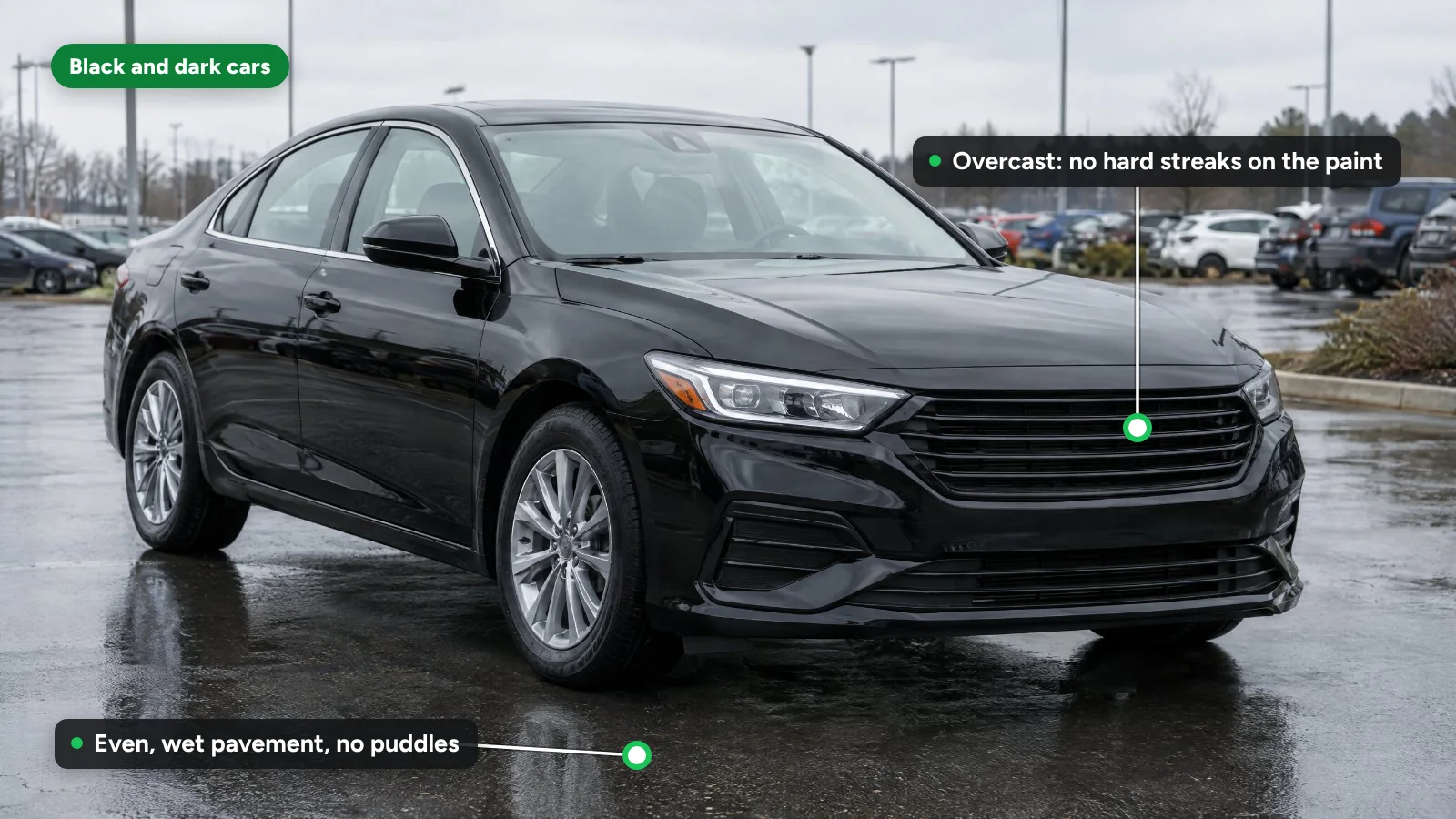
- Watch the ground. Even, wet pavement reflects the car and can look good. Puddles under the wheels break the car's outline, so move the car or change your position.
- Dry before close-ups. Water beads on paint read as "not cleaned" in detail shots.
- Keep the lens dry. One drop blurs part of the frame. Hold an umbrella over the phone, not yourself, and wipe the lens between angles.
- Shoot just after rain stops. The light is usually soft and the air is clear.
Is overcast weather good for car photos?
Often it is the best weather you will get. A cloud layer acts as a large diffuser: shadows soften, hot spots on the paint disappear and colors look closer to what a buyer sees in person. Winter sun sits low in the sky, which throws long shadows across the lot and puts glare on the side of the car facing it. Our article on how lighting conditions affect car color and texture explains why.
Snow adds one complication. A bright white ground can make the phone darken the whole picture, so check that the car, not the snow, looks correctly exposed.
How do you plan around short winter days?
From November the usable window shrinks, so plan the day around it:
- Shoot new arrivals at midday, when light is most even, and queue late arrivals for the next morning.
- Stop at the end of civil twilight. The National Weather Service defines civil twilight as ending when the geometric center of the sun is 6 degrees below the horizon. During it, objects on the ground can still be made out and "in many cases, artificial lighting is not needed." After that, lot lights take over.
- Avoid shooting under lot lights. Mixed overhead lighting gives color casts that differ from car to car.
Does cold weather affect phone cameras?
Yes, mainly through the battery. Apple says "iPhone and iPad devices are designed for use where the ambient temperature is between 0º and 35º C (32º to 95º F)," and that using one in very cold conditions outside that range "might temporarily shorten battery life and could cause your device to turn off." Samsung gives the same optimal usage temperature for Galaxy phones, 32° to 95°F, and warns that extended use below 32°F "will exacerbate battery performance and may lead to unexpected shutdowns."
On a 20°F morning, that means:
- Keep the phone in an inside pocket between cars, not in a cold car or on the hood.
- Shoot in batches of a few cars, then warm up inside.
- Start with a full charge and keep a spare charged phone at the desk.
- Use touchscreen gloves so nobody shoots bare-handed and rushes.
How do you stop lens fog and condensation?
Fog forms when a cold phone meets warm, humid air, such as walking from the lot into the showroom. A fogged lens gives soft, low-contrast photos that look like a focus problem.
Camera makers give similar advice for their own equipment. Sony's help guide for its action cameras says to seal a cold camera in a plastic bag before bringing it into a warm place, and to remove the bag once the air inside reaches the surrounding temperature, "after about 1 hour." For a phone, avoid repeated trips between warm and cold, wipe the lens with a clean microfiber cloth, and check the first photo of each car at full size before moving on. Fog on the inside of the car's glass is a separate issue. The defroster fixes it.
How do you photograph black and dark-colored cars?
Dark paint works like a mirror. Everything around the car appears in its panels, including buildings, other vehicles and the person holding the phone.
- Control what reflects. Position the car so the area behind you is plain: open sky, a blank wall or an empty part of the lot.
- Prefer overcast light. Direct sun creates bright streaks on black paint. Clouds give an even sheen that shows body lines.
- Try a clip-on polarizer. A circular polarizing filter for phones cuts glare on glass and paint as you rotate it. Set it once per car and keep it the same for the whole set.
- Raise exposure slightly. Tap the car to focus, then drag the exposure control up until the paint shows detail without washing out the sky. Many phone cameras let you lock focus and exposure by pressing and holding on the subject.
- Treat black cars in snow as the hardest case. The white ground pulls exposure down and the car turns into a silhouette. Pull it onto cleared pavement, or raise exposure further and check the result.
- Clean more carefully. Dust, salt film and swirl marks show far more on dark paint.
How do you photograph cars on a crowded lot?
Do not photograph a car where it is parked. Pull it to a dedicated photo spot instead:
- Pick one spot and mark it. Paint or tape where the front wheels go and where the photographer stands for each angle. The same spot every day keeps sets consistent.
- Keep other cars out of frame. Partial bumpers, badges and plates at the edges distract buyers. Google's vehicle ads image guidelines list a cluttered background as a discouraged practice that "could negatively impact performance."
- Use the main lens, not the ultra-wide. The 0.5x lens fits a car into a tight space but stretches the front and shrinks the rear. If you cannot step back far enough with the 1x lens, the spot is too small.
- Leave margin around the car. A clear border makes cropping and background replacement easier later.
When should you switch to an indoor bay or background replacement?
Move indoors or replace the background when outdoor results will not match the rest of your inventory:
- Steady rain or falling snow that wets the car again as soon as you dry it.
- Temperatures below your phones' operating range, which risks shutdowns mid-set.
- After the light is gone, when lot lights are the only source.
- No clear spot, during a busy weekend or after a large delivery.
Cold-weather car photo checklist
| Step | Check | Why |
|---|---|---|
| Wash | Lower panels and wheels free of salt film | Salt streaks show on dark paint and in wheel close-ups |
| Dry | Paint and glass dry, no drips | Water spots show in reflections |
| Clear | No snow on the car; tires on pavement | Buyers need to see every panel |
| Glass | Defrosted and wiped inside | Hazy interiors look dirty |
| Mats | Clean, dry set fitted | Salt stains make interiors look worn |
| Phone | Charged and kept warm | Cold shortens battery life |
| Lens | Wiped, no fog | Fog looks like a focus fault |
| Spot | Clear background, marked positions | Consistent sets across days |
| Lens choice | 1x main lens | Ultra-wide distorts the car |
| Review | First frame checked at full size | Catches fog and exposure problems early |
Where does HelloRamp.ai fit?
HelloRamp Studio's AI-guided vehicle photography walks any staff member through a fixed sequence of angles on a phone. It detects when the phone is positioned correctly and runs a quality check on each frame that flags cropped shots and dirty cars. A car takes under five minutes to shoot, with no booth or lighting setup. On the Pro and Ultra plans, Smart Fixes run across the whole set: lighting is balanced, reflections are cleaned up and crooked angles are straightened. You can place cars on any of 100+ studio backgrounds, including indoor showroom and outdoor scenes, and a trained HelloTrust reviewer checks every image before it publishes. Dealerships across the US, Canada and India use the same guided capture year-round.
Sources
- Apple Support: If your iPhone or iPad gets too hot or too cold (published May 14, 2026)
- Samsung US: Galaxy Battery Care and Maintenance (current)
- National Weather Service: Definitions of Twilight (current)
- Sony Help Guide (FDR-X3000/HDR-AS300/HDR-AS50): On moisture condensation (2016)
- Google Merchant Center Help: Vehicle ads image guidelines (current)
Frequently asked questions
Is a cloudy day better than a sunny day for car photos?
Usually, yes. Overcast skies soften shadows, remove hot spots on the paint and show color closer to how the car looks in person. Low winter sun throws long shadows and glare across the lot. For the most even light, shoot at midday on a cloudy day.
How cold is too cold to photograph cars with a phone?
Apple and Samsung both list 32°F to 95°F as the range their phones are designed for or work best in. Below freezing, batteries drain faster and phones can shut off, so keep the phone warm in an inside pocket and shoot in short batches.
How do you reduce reflections when photographing a black car?
Position the car so whatever sits behind the camera is plain, such as open sky or a blank wall, and shoot under overcast light. A clip-on circular polarizer cuts glare on paint and glass. Raise exposure slightly so the dark paint shows detail without washing out the sky.
Should you photograph a used car with snow on it?
No. Clear snow from the roof, hood, glass, wheels and plate area, and clear the ground so the tires sit on pavement. Snow hides panels and damage the buyer needs to see, and a partly covered car looks neglected next to clean listings.
How do you take car photos on a full dealership lot?
Pull each car to one marked photo spot with a clear background instead of shooting it where it is parked. Keep other cars out of the frame, use the main 1x lens rather than the ultra-wide, and shoot from the same marked positions every time.
HelloRamp Studio guides the walkaround, corrects the lighting and backgrounds, and produces the listing stills, the 360° spin and the video tour from one five-minute capture on a phone. No booth, rig or dedicated photographer.