
Dealer Photo Overlays, Banners and License Plate Blurring: Branding Rules for Listing Photos
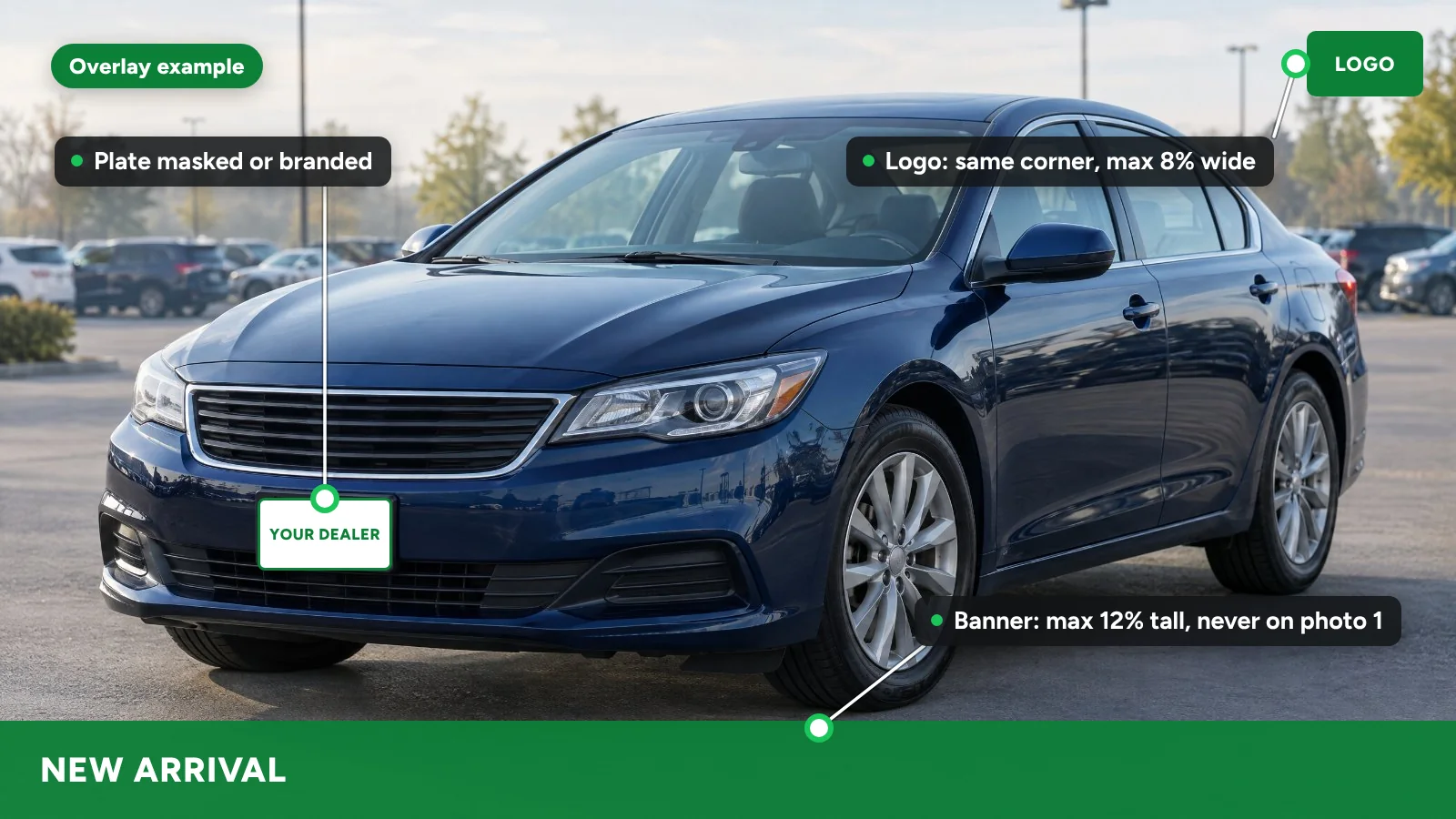
A dealer photo overlay is a graphic layer on a vehicle photo: a frame, logo, price banner, new-arrival tag or contact strip. The safe pattern is a clean lead photo, one small logo in the same corner of every image, banners driven by the live price and sold status, and an overlay-free copy for channels that reject graphics.
License plate blurring is optional under US federal law, but many dealers mask or replace plates for a cleaner, consistent set. This guide covers the branding and privacy layer of a listing. For the listing as a whole, see our guide to vehicle merchandising.
Why do dealers blur license plates in listing photos?
Dealers mask plates for three practical reasons:
- Privacy. A trade-in may still carry the previous owner's plate, and a plate is tied to a registration.
- A cleaner look. Mismatched plates, temporary tags and plate frames from other dealers distract from the car.
- Consistency. Every unit looks the same when every plate is treated the same way.
One channel discourages masking: Google's vehicle ads image guidelines list "Modification on the license plate" as allowed but discouraged.
How do dealers blur license plates?
| Method | How it works | Watch for |
|---|---|---|
| Manual editing | A person blurs, pixelates or covers the plate in a photo editor | Slow on every image; angled and partial plates get missed |
| Phone app | Per-image blur or sticker in a mobile editing app | Same misses; results vary by staff member |
| Automated masking | Software detects and masks the plate across the whole set | Check front plates, reflections and temporary tags in windows |
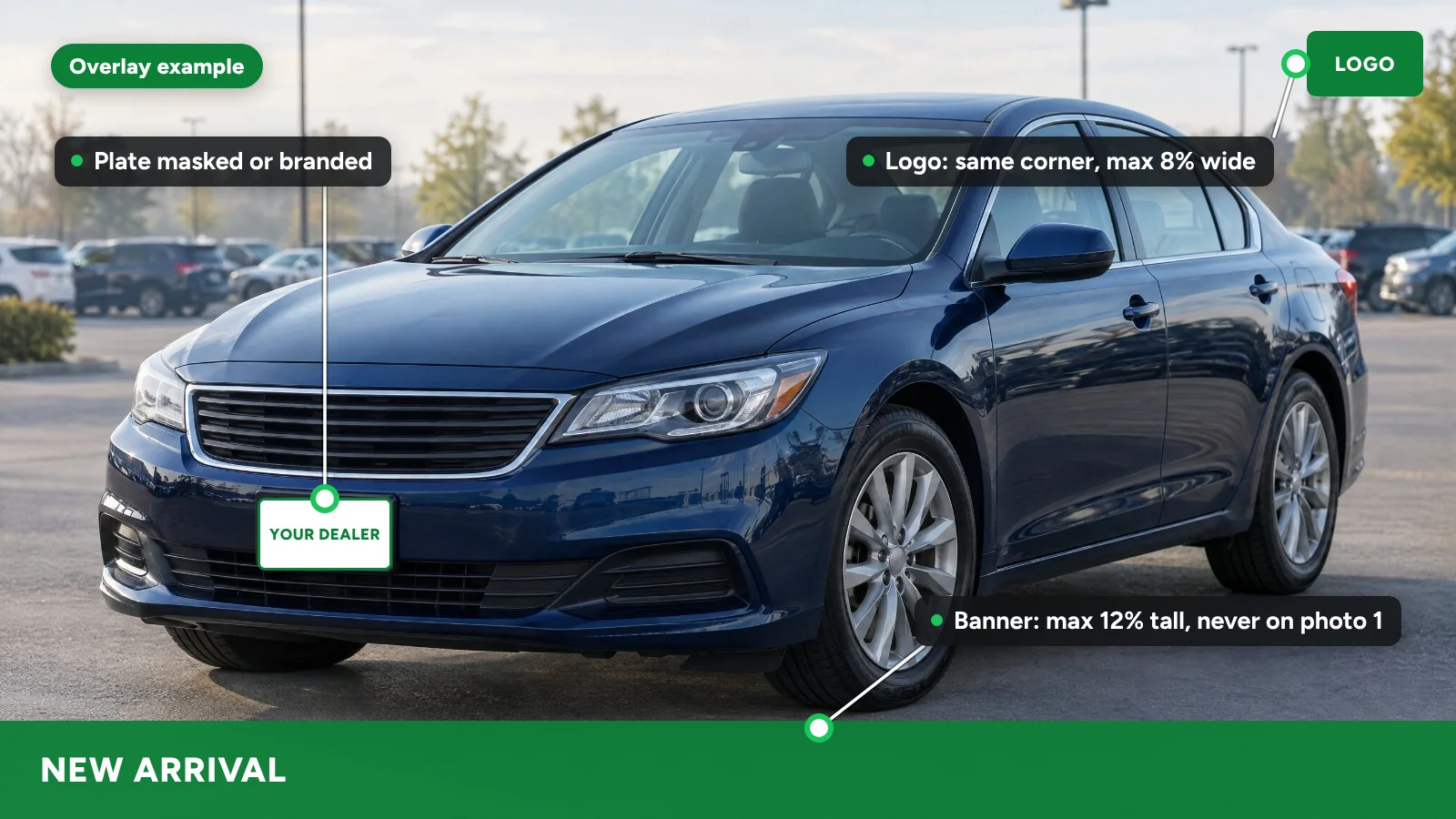
| Branded plate | Your dealership plate graphic is composited onto every plate | Must sit in perspective; never cover body damage |
Which overlays do dealers add to vehicle photos?
| Overlay | When to use | Main risk |
|---|---|---|
| Frame or border | Your own website and social posts | Shrinks the car; rejected by channels that disapprove superimposed graphics |
| Logo bug | Small, same corner, every image | Low on most sites; Google disapproves superimposed logos |
| Price banner | Sparingly, never on the lead image | Goes stale after a price change; must match the all-in price |
| New-arrival tag | First 7 to 14 days in stock | Left on long after the car is new |
| Price-drop flag | Only after a real reduction | A former price that was never really charged |
| Feature callouts | Detail and interior images | Wrong equipment if typed by hand instead of pulled from the vehicle record |
| Contact or CTA strip | Your website and social | Listing sites may strip contact details that bypass their lead routing |
What do Cars.com, CarGurus, Google and Facebook Marketplace allow?
None of the policies below bans overlays outright, but each one limits what an overlay can say.
- Cars.com: the Vehicle Listing Policy (last revised June 23, 2026) says media "must accurately depict the vehicle the Dealer is selling." It also says "Dealers are prohibited from using any Content to promote special offers," prices other than the listing price, or payment and financing models. That rules out banners with a different price or a payment offer. Its help center documents an overlay library for inventory photos (transparent PNG files, 2048 x 1536 px).
- CarGurus: the Dealer Pricing Policy requires listing images and videos to accurately represent the vehicle. It also says CarGurus "may exclude or remove from the Site embedded contact information in images, often known as 'Watermarking,'" when it judges that information is meant to get around CarGurus lead routing. Leave phone numbers off photos sent there.
- Google Vehicle Ads: the image guidelines list "No overlaid watermarks" and "No superimposed logos or text" among their disapproval policies, so send clean images there.
- Facebook Marketplace: Meta's automotive catalog reference allows up to 20 images per vehicle, requires at least 2 for Marketplace and sets no overlay rule. Marketplace listings also fall under Meta's Commerce Policies, so check those before you list.
Should the first photo have an overlay?
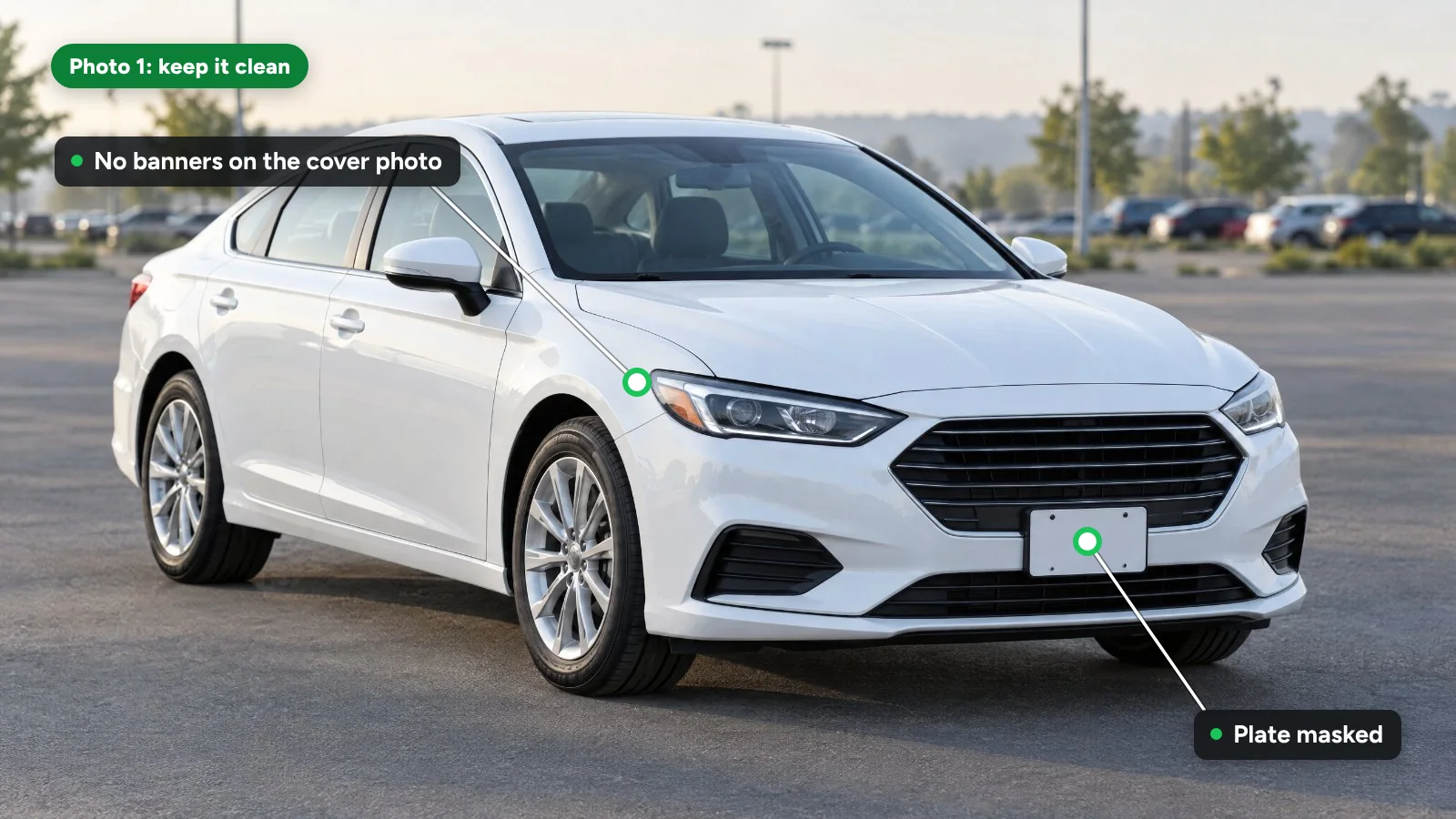
Keep the lead image clean or close to it. It becomes the thumbnail in every search result, and Cars.com sets the first image as the cover photo automatically. Google also lists rear-angle images as discouraged for the main image.
A workable rule: front three-quarter view, no text, and at most a small logo bug on your own website. Put price banners and callouts on later images, or on a branded closing image at the end of the set.
What rules do price banners need to follow?
A price banner is advertising. The FTC's September 2026 pricing transparency FAQs say the rules cover "dealership or third-party websites, social media, print advertisements," and that "On webpages that state any amount a consumer may pay, the actual price must be listed as the most prominent amount." They add that "Prominence is not limited to font size," and that a dealer "cannot advertise a price around a discount or rebate only available to a subset of buyers." A big banner with a conditional price fails that test.
Two more checks:
- Sold and unavailable cars. In March 2026 the FTC warned 97 dealership groups, and the letters listed "advertising unavailable or non-existent vehicles" among the practices of concern. Overlays and posts should come down when the car sells.
- Price-drop flags. The FTC's Guides Against Deceptive Pricing treat a former price as genuine when it was "the actual, bona fide price at which the article was offered to the public on a regular basis" for "a reasonably substantial period of time." Flag only real reductions from a price the car actually carried.
What should a dealer overlay template include?
These are sample figures. Test each on a phone before rollout.
| Item | Sample spec |
|---|---|
| Canvas | Design at 4:3, the ratio Cars.com recommends for VDP photos; test crops for square and vertical social formats |
| Safe zone | No graphics over the car; keep overlays in the outer 10% of the frame |
| Logo bug | No wider than 8% of image width, same corner on every image |
| Banner | Bottom strip no taller than 12% of image height; never on image 1 |
| Text | Five words or fewer, legible on a phone thumbnail |
| Colors | Two brand colors with strong contrast against the background |
| Price fields | Pulled from the live all-in price, never typed into the graphic |
| Update rules | New-arrival tag off after 14 days; price-drop flag only after a real reduction; all overlays off when sold |
| Clean copies | Overlay-free version of every image kept for feeds that reject graphics |
Can an overlay cover damage on a car?
No. An overlay over a scratch, dent or curb-rashed wheel misrepresents the car as much as editing the flaw out, and Cars.com and CarGurus both require media to accurately show the vehicle. If a banner would cover a flaw, move it or use another image.
How does HelloRamp.ai handle overlays and plates?
HelloRamp Studio masks plates automatically on every image or composites the dealer's own branded plate, and applies the dealer logo in the same spot on every image. Banners, price flags, contact details and feature callouts come from brand-locked templates (100+ of them), and feature callouts are pulled from each vehicle's own record. Rules apply them automatically: a new-arrival banner, a red price-drop flag, and all overlays removed when a car is marked sold. Branded sets can then go to your connected social accounts through HelloRamp Social. Dealerships in the US, Canada and India run the same rules across their inventory.
Before anything publishes, a trained reviewer compares every image with the original capture through HelloTrust, looking for softened badges, shifted paint colors and dents that automated editing removed.
Sources
- Cars.com (Cars Commerce): Vehicle Listing Policy (last revised June 23, 2026)
- Cars Commerce Help Center: How to manage inventory photos (current)
- Cars Commerce Help Center: How to size your inventory photos for best results (current)
- CarGurus: Dealer Pricing Policy (current)
- Meta for Developers: Automotive ads catalog reference (current)
- Google Merchant Center Help: Vehicle ads image guidelines (current)
- FTC: Automobile Industry Pricing Transparency FAQs (September 2026)
- FTC: FTC warns 97 auto dealership groups about deceptive pricing (March 13, 2026)
- Cornell LII: 16 CFR 233.1, Former price comparisons (current)
- Cornell LII: 18 U.S.C. 2721, Driver's Privacy Protection Act (current)
- Justia: California Vehicle Code 11713.1 (2024)
Frequently asked questions
Is it illegal to show a license plate in a car listing photo?
We are not aware of a federal law that requires dealers to blur plates in listing photos. Many dealers mask them anyway for privacy and a consistent look. Some states set advertising rules that involve the plate or VIN, so check your state's dealer advertising code with counsel before changing your process.
Can a dealership put its logo on vehicle photos?
Yes, on your own website and social channels, and the listing-site policies we reviewed do not ban a small logo. Keep it small, in the same corner on every image and off the car itself. Google Vehicle Ads disapproves superimposed logos, so send clean copies to that feed.
Does CarGurus allow watermarks on dealer photos?
CarGurus's Dealer Pricing Policy says it may remove embedded contact information in images, which it calls watermarking, when it is meant to get around CarGurus lead routing. A small logo is a different matter, but leave phone numbers and website addresses off any photos you send to CarGurus.
Should dealers put the price on vehicle photos?
Only with care. A price in an image goes stale when the price changes, and FTC guidance says the actual price must be the most prominent amount on any webpage that states a price. If you use a banner, pull it from the live price and keep it off the lead photo.
How long should a price-drop flag stay on a listing photo?
Keep it while the reduction is recent, such as 14 days, and remove it at the next price change. FTC pricing guides treat a former price as genuine only if it was really offered for a reasonably substantial period, so never flag a drop from a price the car never carried.
HelloRamp Studio guides the walkaround, corrects the lighting and backgrounds, and produces the listing stills, the 360° spin and the video tour from one five-minute capture on a phone. No booth, rig or dedicated photographer.